Review readers skim. They want the score, the price, the good, the bad and the verdict, in roughly that order, before they decide whether to read the full review. A theme that buries those in paragraphs makes them work for it, and they will go to a site that does not.
Ghost is a good platform for independent reviewers: fast, clean to write in, with a newsletter and memberships for readers who want more. But it has no review features of its own. This guide covers what a tech review site needs from a Ghost theme, and how our theme, Pixel, builds it from plain editor content.
What a review site needs
A visible score
On every card in a list, and big on the review itself. Readers compare scores across reviews, so it should use the same scale everywhere.
The price
What it costs at the time of review, on the card and the review.
Pros and cons
Two short lists, side by side, before or after the detail. This is the most-read part of most reviews.
A verdict
One paragraph that says who should buy it and who should not, with the score next to it.
A "best of" view
A list of your top-rated products, ordered by score, so readers can see your recommendations without searching.
A modern, app-like design
Tech readers expect a site that looks as current as the products it reviews: clean grids, rounded cards, quick to use on a phone.
How Pixel handles it
Pixel is a sharp Ghost theme for tech reviews, built so that writers never leave the normal editor.
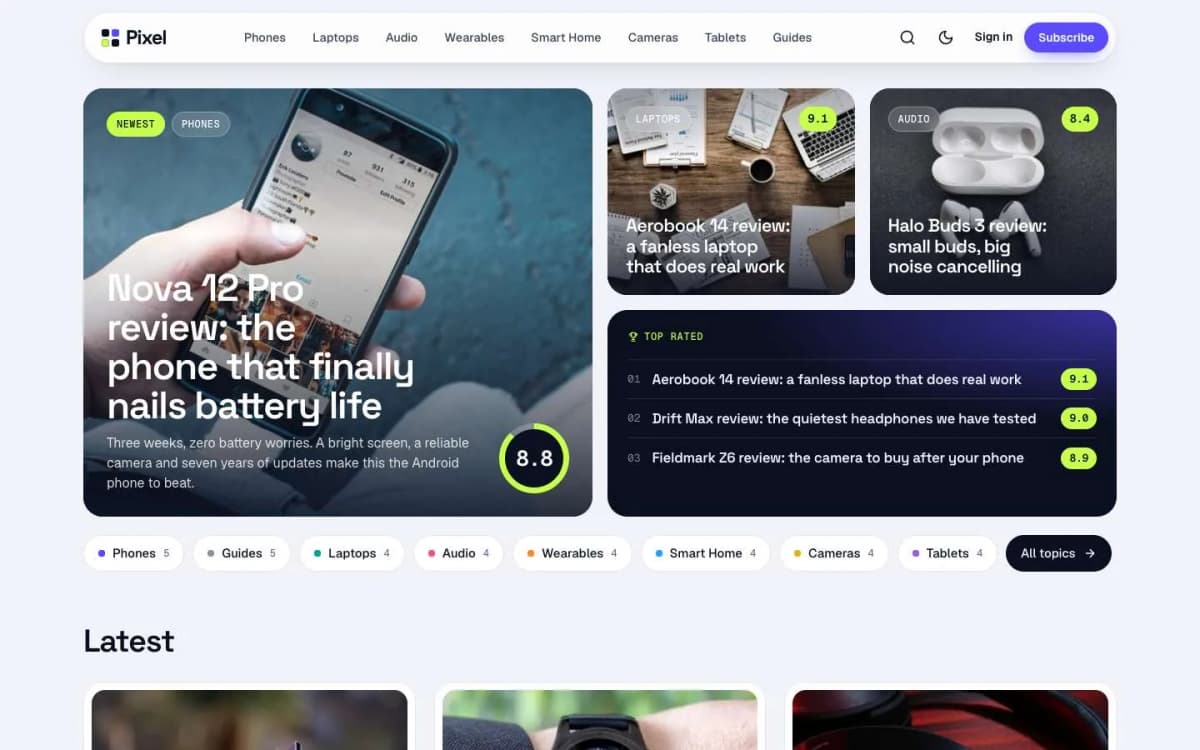
Scores from one tag. In the post settings, add an internal tag like #score 8.8. The score shows as a chip on every card and as a score ring on the review and in the Verdict box. Choose a scale of 10, 5 or 100 in the theme settings.
Price chips. Add an internal tag like #price $899. Whatever follows #price is shown as written.
Pros and cons cards. Write a heading "Pros" with a bulleted list, then a heading "Cons" with another list. Pixel turns them into a green card and a red card, side by side.
Verdict box. Write a heading "Verdict" followed by one or more paragraphs. Pixel turns them into a dark panel with the score ring. The words Pros, Cons and Verdict come from the translation file, so they follow your site's language.
Bento homepage. One large lead story, two mid tiles and a Top rated panel in a rounded grid. The Top rated panel orders your featured reviews by score, best first.
Topic chips under the bento for fast browsing, each topic in its own colour (from the tag's accent colour), plus Topics and Writers pages.
Two post layouts. Review, with the title, score ring and price beside the feature image; and Cover, with a full-width image above a centred title for guides and features. Both show a sticky contents list on wide screens.
A floating pill header with search, a light/dark toggle and member buttons, and a large dark footer with your site name as a giant wordmark.
Memberships. A membership page with tiers and a monthly/yearly switch, a styled paywall for members-only reviews, and sign-in, sign-up and account pages.
Details. Light, dark and system modes; reading progress; lightbox; galleries; spec tables and toggle cards; self-hosted Space Grotesk, Geist and Geist Mono fonts; full translation support; 17 theme settings; no jQuery.
Open a review on the Pixel live demo.
What Pixel does not do
- No review rich results. Pixel does not output review structured data, so search results will not show stars from the theme.
- No price feeds. Prices are what you type. Update them when they change, and date your reviews.
- No comparison database. There are no product spec databases or "compare these two phones" tools; write comparisons as posts with tables.
- Not for daily news. If you publish many news items a day, Gazette is a better fit.
Writing reviews that readers trust
- Use one scale and explain it. Publish a short "How we score" page and link it from every verdict.
- Date every review and note the price on that date. Prices move; trust does not recover from stale numbers.
- Say who it is for. The verdict should name the buyer, not just the product.
- Keep pros and cons short and specific. "Battery lasts two days of normal use" beats "Great battery".
- Disclose affiliate links and free samples. Readers and, in many countries, the law expect it.
- Update your top-rated list. Feature only reviews you still stand behind; Pixel orders them by score automatically.
Making money from a review site on Ghost
- Affiliate links in your text, disclosed clearly.
- A newsletter with the week's reviews and deals. Ghost sends it from the same site.
- Paid membership for in-depth tests, buying guides or early reviews. Pixel's paywall keeps the score and summary visible to everyone, which is often enough to convert. See Ghost memberships with Stripe.
Other themes to consider
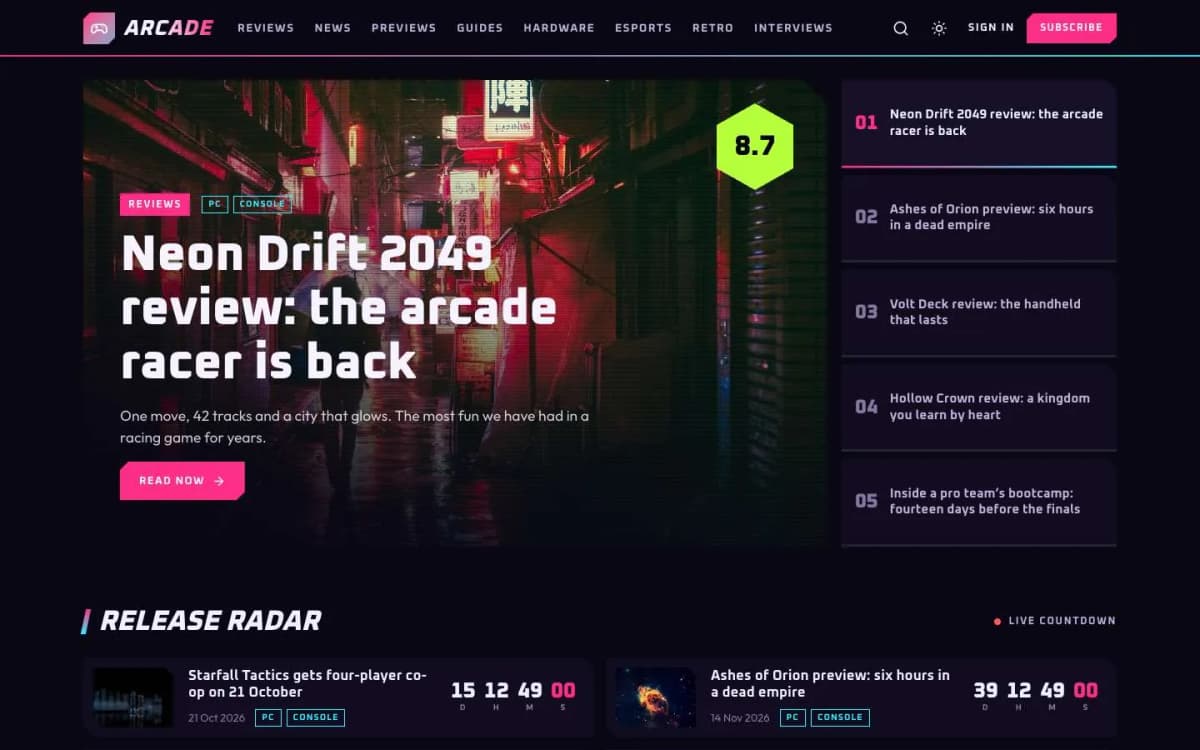
- Arcade: for game reviews with score hexagons, rating bars and release countdowns. See the best Ghost theme for a gaming site.
- Launch: for a software company's own product blog.
- Browse every theme on our Ghost themes page.
A review template you can reuse
Consistency builds trust. Using the same structure for every review lets readers compare quickly:
- Verdict first: one or two sentences and the score.
- Who it is for: the reader who should buy it, and who should not.
- Design and build.
- Performance: what you tested, how, and what you found.
- Battery, software or other category-specific sections.
- Pros and cons.
- Price and alternatives: what else to consider at the same price.
- How we tested: a short note on how long you used it and in what conditions.
Save this structure as a snippet in Ghost so each new review starts from the template.
Disclosure and independence
Readers of review sites are rightly suspicious. Be clear about:
- whether the product was bought, loaned or given to you;
- whether you earn a commission from links;
- whether the manufacturer saw the review before publication (ideally not).
Put a short disclosure at the top or bottom of each review and a full policy on an about page. Independence is the review site's main asset; it is worth more than any single affiliate payment.
Keeping reviews up to date
Prices change, software updates fix problems, and newer models arrive. Review your most-read reviews every few months: update the price, add a note about important updates and link to newer alternatives. Add a short "Updated" note with the date at the top, so returning readers can see the review is current.
Photos that help readers decide
Take your own photos of every product you review, showing its real size, ports, screen and any flaws. Manufacturer images all look alike; your own photos prove you used the product.
Bottom line
A review theme should show the score, price, pros, cons and verdict at a glance, and keep a top-rated list up to date for you. Pixel does that from plain editor content and two internal tags, with no plugin, for $59.
Try it: open the Pixel demo and get Pixel. Want your existing reviews moved and set up? Our Ghost theme install and setup service can help.
Frequently asked questions
Add an internal tag that starts with #score, for example #score 8.8, in the post settings. The score appears as a chip on cards and as a ring on the review and in the Verdict box. You can choose a scale of 10, 5 or 100.
No. Write a heading called Pros with a bulleted list under it, then a heading called Cons with another list. Pixel places them side by side as a green card and a red card.
Pixel does not add review structured data, so Google will not show stars from the theme. Ghost adds standard article data to every post.
No. The price chip shows the text you write in a #price tag, for example #price $899. There are no price-comparison feeds or affiliate data tables.