Substack made it easy for writers to start a paid newsletter. Many writers now want what it does not give them: their own brand and design, their own domain without compromise, and the full value of their paid subscriptions, without a percentage going to the platform. Ghost is where most of them go.
This guide explains what moves from Substack to Ghost, what does not, and the order to do it in.
Ghost vs Substack in one minute
| Substack | Ghost | |
|---|---|---|
| Revenue share on paid subscriptions | Yes | None (Stripe fees only) |
| Design | Substack's templates | Any theme, fully customisable |
| Domain | Custom domain available | Your domain, fully |
| Hosting | Substack only | Ghost(Pro) or self-hosted |
| Discovery network | Yes | No |
| Ownership of code and data | Platform | Open source; export anytime |
If discovery through Substack's network is bringing you most of your new subscribers, weigh that honestly. If most of your growth comes from your own efforts, Ghost usually wins on revenue and control.
What moves
- Posts, including images, from your Substack export.
- Free subscribers, from the subscriber list in your export.
- Paid subscribers, through Stripe: Substack uses Stripe, and Ghost can connect to the same Stripe account, so existing subscriptions can continue.
- Your domain, if you used a custom domain on Substack.
What does not move
- Substack's recommendations and network discovery.
- Comments and likes. Ghost has its own member comments, starting fresh.
- Substack-specific features such as Notes and chat.
- Podcast hosting, if you used Substack for audio. Plan a separate podcast host; see the best Ghost theme for a podcast.
The migration, step by step
1. Export from Substack
In your Substack settings, export your data. You get your posts and a list of subscribers. Keep the original files safe.
2. Set up Ghost
Choose Ghost(Pro) or self-hosted Ghost. Start on a temporary address so you can test before switching your domain.
3. Choose and set up your theme
This is the moment to get the design you could not have on Substack. Writers moving from Substack often choose:
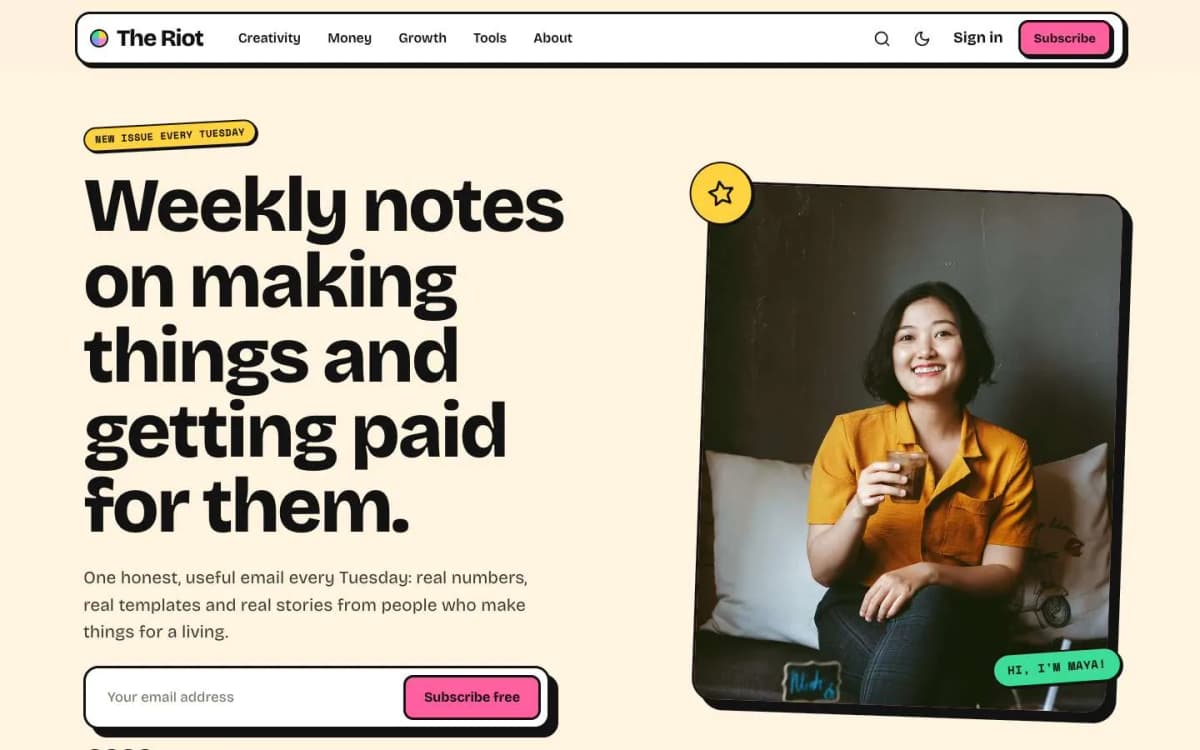
- Riot for a personal, colourful creator brand. See the best Ghost theme for a creator newsletter.
- Marlowe for a warm, editorial magazine or essay newsletter, with a newsletter-first homepage layout.
- Ledger for finance and business briefings.
Every one of our Ghost themes includes a membership page, styled paywall and account pages, and has a live demo.
4. Import posts
Use Ghost's Substack migration tools in the admin to import your posts. Then check:
- formatting, images and embeds on your most-read posts;
- that paid posts kept the right access level;
- authors, if you had guest writers.
5. Connect Stripe and set up tiers
In Ghost's membership settings, connect the same Stripe account Substack used. Create tiers that match your Substack prices so existing paid subscribers keep their price. Our guide to Ghost memberships with Stripe covers tiers in detail.
6. Import subscribers
Import free and paid subscribers with Ghost's tools. For paid subscribers, Ghost matches them to their existing Stripe subscriptions. Test with a handful first:
- Can a test paid subscriber sign in and read paid posts?
- Does their account page show the right plan and renewal date?
- Are free subscribers receiving emails?
7. Stop Substack from charging and emailing
Once paid subscribers are on Ghost, make sure Substack is no longer managing or charging those subscriptions, and turn off sending from Substack, so nobody is billed twice or gets two emails. Follow Substack's and Ghost's current instructions carefully here, and double-check in Stripe.
8. Move your domain
If you used a custom domain on Substack, point it at Ghost. If you used a substack.com address, you cannot redirect it yourself; link to your new site from your last Substack post and your Substack about page.
9. Send a welcome-to-the-new-home email
From Ghost, send a short issue: what moved, why, what stays the same (the writing, the schedule, the price), and what is better (the site, the archive, perhaps a new perk). Readers rarely mind a move that is explained.
10. Check deliverability
New sending infrastructure can affect inbox placement. On Ghost(Pro), email sending is handled for you; when self-hosting, you configure an email provider. Watch open rates for the first few sends, and ask readers to add your address to their contacts.
Growing without the Substack network
Discovery is the main thing you give up. Replace it deliberately:
- Search. Ghost sites are crawlable websites; write some evergreen posts that answer questions people search for.
- Cross-promotion with writers in your niche.
- Referrals. Ask readers directly to forward issues.
- Social clips of your best paragraphs, linking to the post.
- A strong homepage with a clear promise and signup form. Riot and Marlowe's Newsletter layout are built for this.
A timeline for a calm migration
Rushing a migration is how subscribers get double-charged or miss an issue. A two-week plan works for most newsletters:
Week one: build
- Set up Ghost and the theme, write your welcome email and create your tiers.
- Import posts and check a sample of old posts, especially images, embeds and footnotes.
- Do a test import of subscribers into a staging copy or review the import preview carefully.
Week two: switch
- Pick a switch day just after you send an issue, so you have the longest gap before the next one.
- Export a fresh subscriber list on switch day, so recent signups are included.
- Import subscribers and paid members, then connect Stripe and confirm paid members are matched to their subscriptions.
- Turn off Substack's payments and emails, as described above.
- Move your domain and send the welcome email from Ghost.
After the switch
- Watch replies and bounce reports for the first two or three issues.
- Keep the Substack publication up for a while with a note pointing to the new site, so old links do not lead nowhere.
Questions readers will ask
Prepare short answers for your welcome email or a pinned post:
- "Do I need to do anything?" Usually no. Free and paid subscriptions carry over.
- "Will I be charged twice?" No, if payments were moved correctly. Say so plainly.
- "Why did you move?" Readers appreciate an honest, short reason: ownership, design, lower fees, more control.
- "How do I manage my subscription now?" Point to the account page on your new site.
What to check after a month
- Open and click rates compared with your last month on Substack.
- Whether paid renewals went through as expected.
- How many readers signed up directly on your site.
- Whether old Substack links are still sending traffic, and whether they point to the right place.
Costs after the move
Budget for Ghost hosting (Ghost(Pro) or your own server), Stripe's payment fees and, if you self-host, a bulk email provider. Compare that with Substack's percentage of your paid revenue, using your own subscriber numbers.
When not to move yet
If most of your new subscribers come from Substack's own recommendations and network, measure that first. Moving may slow growth for a while, so time the switch for when your own channels can carry it.
Bottom line
Moving from Substack to Ghost brings your posts, free subscribers, paid subscribers (through the same Stripe account) and domain with you, and gives you full design control with no revenue share. You leave behind Substack's network, comments and in-app features. Test paid flows carefully, stop Substack from billing, and explain the move to readers.
Want help moving? Choose your theme from our Ghost themes, and our Ghost theme install and setup service will set it up and check your memberships end to end. For larger lists or complex paid setups, contact us.
Frequently asked questions
Mainly ownership and revenue. Ghost takes no percentage of paid subscriptions, lets you fully control your design and domain, and is open source, so you can self-host or move hosts. Substack is easier to start and has a built-in discovery network.
Yes, in most cases. Ghost's Substack migration tools import posts and subscribers, and when Ghost is connected to the same Stripe account Substack used, paid subscriptions can continue without readers re-entering card details. Test before moving everyone.
Yes. Discovery inside the Substack network stays on Substack. Plan other ways to grow: search, cross-promotion with other writers, social media and referrals.
The technical import can be done in a day for most newsletters. Allow extra time for checking posts, setting up the design, testing paid flows and telling readers.