"How much does a delivery app cost?" is one of the most common questions we get, and quotes on the internet range so widely that they are almost useless. The reason is simple: a delivery app is not one app. It is five products that have to work together, and every quote includes a different mix of them.
This guide breaks a delivery platform into its parts, explains what drives the cost of each, covers the running costs that quotes leave out, and shows how starting from an app kit changes the maths.
The five pieces of a delivery platform
1. Customer app (iOS and Android)
Browse stores, search, menus with options and add-ons, cart, checkout with addresses on a map, payments, live tracking, order history, ratings, wallet and promotions. This is what everyone pictures, and it is perhaps a third of the work.
2. Rider app
Sign-up with documents, online/offline status, delivery offers with a countdown, step-by-step pick-up and drop-off, proof of delivery, cash handling, earnings. Often forgotten in early budgets, and impossible to run without.
3. Store panel
A live order board that makes noise, accept/reject, mark ready, menu and stock management, opening hours, earnings and reports. Restaurants will not use your platform if this is clumsy.
4. Admin panel
Zones and delivery fees, store and rider approvals, commissions, payouts, coupons, banners, push campaigns, support tickets, refunds, reports, staff roles and an audit log. This is how you run the business day to day.
5. Server and dispatch
The API that connects everything, plus background jobs: offering orders to the nearest riders and re-offering when they decline, timing out stale orders, sending notifications, calculating fees and keeping data consistent. This is invisible and essential.
What drives the cost of a custom build
- How many of the five pieces are included, and how complete each is.
- Platforms. One cross-platform codebase (for example Flutter) for iOS and Android costs less than two native apps.
- Marketplace or single brand. Multi-store adds store onboarding, commissions and payouts.
- Real-time features. Live tracking and dispatch are among the hardest parts to get right.
- Payments. Card payments, cash on delivery, wallets, refunds and local gateways each add work. In some countries, such as Jamaica, the best-known payment providers are not available to local businesses, which changes the integration.
- Design. A custom design system costs more than adapting an existing one.
- Testing and quality. Automated tests, device testing and load testing.
- Store publishing and launch support.
A custom build of all five pieces is a multi-month project for a team of designers, mobile developers, web developers and a project lead. That is why serious quotes for a full marketplace run into many thousands of dollars, and why very cheap quotes usually leave pieces out.
Running costs nobody quotes
Whatever you build, plan monthly costs for:
- Server and database hosting.
- File storage for images and documents.
- Maps and address search. Free options exist (OpenStreetMap); commercial map services charge by usage as you grow.
- Payment processing fees on every card order.
- Email and push notifications.
- App store developer accounts.
- Maintenance: operating system updates, new phone models and store policy changes mean apps need regular updates even when you add no features.
The app kit route
An app kit gives you all five pieces as working source code, so you skip most of the build and pay for setup and the changes that matter to your market.
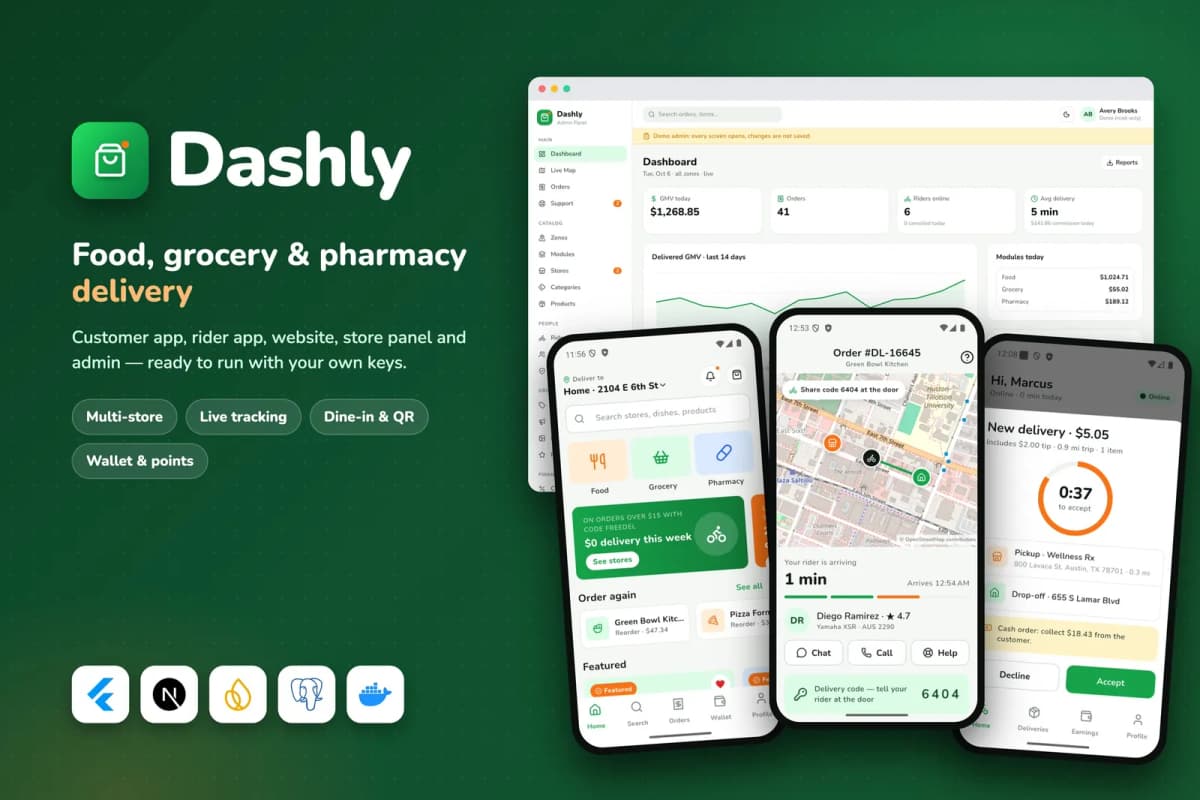
Dashly, the delivery kit we built, includes:
- a customer app with food, grocery and pharmacy stores, live tracking, wallet, points and referrals;
- a single-restaurant mode with dine-in QR ordering and reservations;
- a rider app with offers, proof by code or photo, cash limits and earnings;
- a website, store panel and admin panel with zones, commissions, payouts and campaigns;
- the server and dispatch worker, a Docker setup, documentation and a rename tool.
It uses free defaults where it can: OpenStreetMap for maps, a bundled storage server, and a labelled demo payment mode until you add a Stripe key, so you can evaluate it before paying for any service. You can click through the whole flow on the Dashly demo.
What the kit route costs with us
| Item | Price |
|---|---|
| Dashly regular licence | $69 |
| App kit install and setup on your server | from $149 |
| Rebrand and publish to the stores | from $499 |
| Custom changes for your market | quoted per job |
| Server, services and developer accounts | your own accounts |
The kit will not match your exact vision on day one. But you can take real orders while you decide which changes are worth paying for, instead of paying for everything before the first order.
Questions to ask any delivery app developer
- Which of the five pieces are included, exactly?
- Is it one cross-platform codebase or two native apps?
- How does dispatch work: automatic offers, manual assignment, or both?
- Which payment methods, including cash on delivery and local gateways?
- Who owns the source code, and where is it hosted?
- What are the monthly running costs at 100 and at 1,000 orders a day?
- Who publishes to the stores, under whose accounts?
- What support and updates are included after launch?
Launching in one area first
The biggest cost of a delivery business is rarely the software. It is getting enough stores, riders and customers in the same place at the same time. Most successful local delivery businesses start small:
- One area: a neighbourhood, a town or a campus where you can deliver quickly.
- A handful of committed stores: enough choice to be useful, with owners who will answer the phone.
- A small rider team that you know and can train.
- A clear delivery fee and time promise that you can actually keep.
Once orders are steady and the operation works, expand to the next area. The software should support this, with delivery zones and fees you can change from the admin panel.
Questions to answer before you spend on software
- Who are your first ten stores? Have you spoken to them?
- How will you pay riders? Per delivery, per hour or a mix?
- How will customers pay? Cards, cash on delivery, mobile wallets?
- What commission or fee will stores accept?
- Who answers customer complaints at 9 pm on a Friday?
If these are not answered, a perfect app will not save the business. If they are, an app kit can get you running quickly and cheaply, and a custom build can come later when you know exactly what you need.
Protecting your budget
Keep money back after launch. Plan for marketing to customers, incentives for the first stores and riders, and a few months of hosting and support. Many delivery start-ups spend everything on the app and have nothing left to get people to use it.
Legal basics
Check local rules for food handling, rider employment or contracting, and data protection before launch. An hour with a local lawyer is cheap compared with fixing a problem later.
Bottom line
A delivery platform is a customer app, a rider app, a store panel, an admin panel and a dispatch server. Building all of it from scratch is a serious, multi-month investment; quotes that seem cheap usually leave pieces out. Starting from a kit like Dashly gets every piece working first, so your budget goes into your market, your stores and your riders.
See all five pieces working together on the Dashly demo, read our guide to starting a food delivery app business, or ask us for a quote on a custom delivery platform.
Frequently asked questions
Because 'a delivery app' can mean anything from one restaurant's ordering app to a city-wide marketplace with live dispatch. Quotes also differ in what they include: rider app, store panel, admin, server, testing, store publishing and support.
Start from an app kit that already includes the customer app, rider app, store panel, admin and server, then pay only for branding, setup and the changes that matter to your market.
A server, file storage, email, map and address services as traffic grows, payment processing fees per order, push notifications, app store developer accounts, and ongoing maintenance. Many have free tiers at small volumes.
With a kit, installation can take days and store publishing a few weeks including reviews. A custom build typically takes many months before the first order.